02 February 2015

LibreOffice 4.4 Language Support


General Language Support

Running down the languages listed in ">Tools >Options >Language Settings >Languages >Default Languages":

Western
  • [None];
  • Afrikaans (Namibia);
  • Afrikaans (South Africa);
  • Aka (Congo);
  • Akan;
  • Aragonese;
  • Armenian;
  • Asturian;
  • Azerbaijani (Latin);
  • Bambara;
  • Basque;
  • Beemba
  • Bekwel;
  • Belarusian;
  • Bosnian;
  • Breton;
  • Bulgarian;
  • Catalan;
  • Catalan (Valencian);
  • Chuvash;
  • Croatian;
  • Czech;
  • Danish;
  • Dibole;
  • Doondo;
  • Dutch (Belgium);
  • Dutch (Netherlands);
  • English: Sixteen locales are available;
  • Erzya;
  • Esperanto;
  • Estonian;
  • Éwé;
  • Faroese;
  • Finnish;
  • French: Fourteen locales are available;
  • Frisian;
  • Friulian;
  • Gaelic (Scotland);
  • Galician;
  • Ganda;
  • Gascon;
  • Georgian;
  • German: Six locales are available;
  • Greek;
  • Guaraní, Paraguayan;
  • Haitian;
  • Hausa (Ghana);
  • Hawaiian;
  • Hiligaynon;
  • Hungarian;
  • Icelandic;
  • Indonesian;
  • Interlingua;
  • Irish;
  • Italian (Italy);
  • Italian (Switzerland);
  • Kaamba;
  • Kabyle Latin;
  • Kalaallisut;
  • Kazakh;
  • Kinyarwanda (Rwanda);
  • Kirghiz;
  • Kituba;
  • Koonga (Congo);
  • Kunyi;
  • Kurdish, Northern (Turkey);
  • Ladin;
  • Lari;
  • Latgalian;
  • Latin;
  • Latvinian;
  • Lengo;
  • Lingala;
  • Lithuanian;
  • Lojban;
  • Low German;
  • Luxembourgish;
  • Macedonian;
  • Malagasy, Plateau;
  • Malay (Malaysia);
  • Maltese;
  • Mbochi;
  • Mongolian (Cyrillic);
  • Moore;
  • Ndebele, South;
  • Ngugwel;
  • Niyem (Congo);
  • Northern Sotho;
  • Norwegian, Bokmål;
  • Norwegian, Nynorsk;
  • Occitan;
  • Oromo;
  • Papiamento (Bonaire);
  • Papiamento (Curaçao);
  • Pitjantjatjara;
  • Polish;
  • Portuguese (Angola);
  • Portuguese (Brazil);
  • Portuguese (Portugal);
  • Puinave;
  • Puna;
  • Romanian (Romania);
  • Russian;
  • Ruysan (Slovakia);
  • Sango;
  • Sardinian;
  • Serbian Cyrillic (Montenegro);
  • Serbian Cyrillic (Serbia);
  • Shuswap;
  • Sidama;
  • Slovak;
  • Slovenian;
  • Somali;
  • Sorbian, Upper;
  • Southern Sutho;
  • Spanish: Nineteen locales are available;
  • Suundi;
  • Swahili (Tanzania);
  • Swazi;
  • Swedish (Finland);
  • Swedish (Sweden);
  • Tajik;
  • Tatar;
  • Teke-Eboo;
  • Teke-Ibali;
  • Teke-Kukuya;
  • Teke-Tyee;
  • Tigrigna (Eritrea);
  • Tok Pisin;
  • Tsaangi;
  • Tsonga;
  • Tswana (South Africa);
  • Turkish;
  • Turkeman;
  • Ukrainian;
  • Uzbek Latin;
  • Venda;
  • Vietnamese;
  • Vili;
  • Walloon;
  • Welsh;
  • Xhosa;
  • Yaka;
  • Yombe (Congo);
  • Zulu;
Asian:

This should be renamed CJKV.
  • [None];
  • Chinese (Hong Kong);
  • Chinese (Macau);
  • Chinese (Singapore);
  • Chinese (Simple);
  • Chinese (Traditional);
  • Japanese;
  • Korean (ROK);
For those who have the ability, and desire to compile their own version of LibreOffice, third party patches for the following are available:
  • Korean (DPRK);
  • toki pona (Korean);
Japanese support explicitly includes:
  • 片仮名 /  Katakana;
  • 平仮名 /  Hiragana;
  • 漢字 / Kanji;
and implicitly includes:
  • 変体仮名 / Hentaigana;
  • Rōmaji;
Ruby Presentation Markup Styles are used for furigana.

Currently,  chữ Nho is not supported as a primary writing system. The workaround is to use a Chinese (something) that one does not usually use.

CTL:

Technically this should be broken into three groups:

BiDi Writing Systems:
  • Arabic: Eight Locales are available; 
  • Hebrew;
  • Persian;
  • Yiddish
For Chaldean, and other ancient BiDi writing systems, the workaround is to use an Arabic variant that one does not usually use.

Indus Valley Writing Systems:
  • Bengali (Bangladesh);
  • Bengali (India);
  • Burmese;
  • Hindi;
  • Dzongkha;
  • Gujurati;
  • Kannada;
  • Khmer;
  • Lao;
  • Limbu;
  • Maithili;
  • Malayalam;
  • Marathi;
  • Nepali (Nepal);
  • Odia;
  • Punjabi;
  • Tamil;
  • Teluga;
  • Thai;
  • Tibetan (India);
  • Tibetan (China);
  • Urdu (Pakistan);
  • Ugyghur;
Other Writing Systems:
  • [None];
  • Amharic;
In looking at these breakdowns, I keep thinking that it would be much simpler to have three selections:
  • Language;
  • Writing System;
  • Locale;
One side effect of doing so, is that it makes proof reading, copy editing, and other general editing functions much easier, when using Braille, Moon, on another A11Y orientated writing systems.

Whilst this requires enabling support for Asian, CTL, and Western writing systems by default, doing so is not a disservice, because writing English requires all three to be enabled, for the appropriate typographical glyphs to be correctly displayed, and printed.

Spell Checking

Spell checkers won't tell one when « A Capella » is being incorrectly spelled as « A Cappella », and vice-versa.  One "p" is Latin.  Two is Italian. One "p" is sacred works sung in a chapel or other religious sanctuary. Nonetheless, they are useful at detecting incorrectly spelled words.

Spell checkers are listed under the highest version of LibreOffice that they have been verified to function correctly.  Listings are in order of "Newest".
(http://extensions.libreoffice.org/extension-center does not appear to offer the ability to sort by extension name.)

Browsing the Extensions, we find spell checkers available for the following languages:

LibreOffice 4.4

Five spell checkers:
  • Upper Sorbian;
  • Moore;
  • Breton;
  • Finnish;
  • Danish;
LibreOffice 4.3

Six spell checkers:
  •  Turkish;
LibreOffice 4.2

Eight spell checkers:
  • Ancient Greek;
  • English (New Zealand);
LibreOffice 4.1

Eight spell checkers:
  • Serbian (Cyrillic and Latin);
LibreOffice 4.0

Fourteen spell checkers:
  • Korean;
  • Tok Pisin;
  • Akan;
  • Bosnian;
  • Lithuanian;
LibreOffice 3.6

Fourteen spell checkers:
  • Arabic;
  • Catalan;
LibreOffice 3.5

Seventeen spell checkers:
  • Vietnamese;
  • Mongolian;
  • Spanish;
  • Portuguese (Portugal);
LibreOffice 3.4

Fifteen spell checkers, all of which are listed above.

LibreOffice 3.3

Sixteen spell checkers:
  • Lower Sorbian;
Updated Spell checkers
Spell checkers that are not updated, are spell checkers that contain incorrectly spelled words, and omit common words.

For the first dozen or so iterations of the Afrikaans spell checker, the words « die », and « ʼn » were omitted. Translated into English, that is « the » and « a ».

The first two or three iterations of the English (South Africa) spell checker include « color », whereas the correct spelling is « colour ».

The site claims twenty-one projects have updated dictionaries, but only the following are listed:

  • Akan;
  • Ancient Greek;
  • Arabic;
  • Bosnian;
  • Breton;
  • Danish;
  • English (New Zealand);
  • Finnish;
  • Korean;
  • Lithuanian;
  • Mongolian;
  • Moore;
  • Portuguese (Portugal);
  • Serbian (Cyrillic and Latin);
  • Spanish;
  • Tok Pisin;
  • Turkish;
  • Upper Sorbian;
  • Valencian Catalan;
  • Vietnamese;
    Available spell checkers
    Seventy-nine are listed on the extension page. I've listed them them from oldest to newest. Some of these have been updated a number of times.

    • Akan;
    • Albanian;
    • Ancient Greek;
    • Arabic;
    • Aragonese;
    • Asturian;
    • Belarusian;
    • Bosnian;
    • Breton;
    • Bulgarian;
    • Danish;
    • English (New Zealand);
    • English (South Africa);
    • English (US)(April 2011 List);
    • Faroese;
    • Finnish;
    • French;
    • Gaelic (Scottish);
    • Galego;
    • German (de-AT iGerman98);
    • German (de-AT);
    • German (de-CH iGerman98);
    • German (de-CH);
    • German (de-DE 1901);
    • German (de-DE Frami);
    • German (de-DE iGerman98);
    • Haitian Creole;
    • Hebrew;
    • Icelandic;
    • Indonesian;
    • Irish;
    • Italian & Latin;
    • Italian;
    • Kashubian: This one states outright that it is no longer maintained;
    • Khmer;
    • Kichwa (Ecuador);
    • Korean;
    • Latgalian;
    • Latin; 
    • Latvian;
    • Lithuanian;
    • Lower Sorbian;
    • Luxembourgish;
    • Malagasy;
    • Marathi;
    • Marshallese;
    • Mongolian;
    • Moore;
    • Norwegian (Bokmål and Nynorsk);
    • Portugal (Portuguese);
    • Portuguese (Brazil);
    • Portuguese (Portugal);
    • Russian;
    • Serbian (Cyrillic & Latin);
    • Shona (Zimbabwe);
    • Slovenian;
    • Spanish (Venezuela);
    • Spanish;
    • Swahili;
    • Swedish (Synlex);
    • Swedish Hyphenation;
    • Tamil;
    • Tibetan;
    • Tok Pisin;
    • Turkish;
    • Ukrainian;
    • Upper Sorbian;
    • Valencian Catalan;
    • Vietnamese;
    • Yiddish;
    Linguist can be abused to create a frequency list of all words used in a document. For proof reading, this is an easy way to avoid the "glazed over eyes" that results from creating the document that one is proof reading. It won't catch words used out of context, but it will pick out « Smith », « Smithe »,« Smythe », and « Smyth ». One virtue of this tool, is that it does not need a spell checker in the appropriate language.  Indeed, it was originally created as a tool to ease the process of constructing dictionaries in languages that lack them.

    Grammar Checking

    Grammar checkers are not a substitute for The King's English, or other books that provide the rules of grammar of the language one uses. Their virtue is that they usually catch repeated words, and incorrectly used punctuation.

    In addition to the built in grammar checking, one can install:
    • Grammalecte: This is a commercially distributed checker for French;
    • Lightproof Grammar Checker: This is for Russian;
    • Corrector Gramatical CoGrOO: This is for Portuguese (Brazil);;
    • After The Deadline: This is a web based grammar checker available for English, French, German, Portuguese, and Spanish. It does not know the difference between American English grammar rules and British English grammar rules;
    • Voikko: This is a spelling, hyphenation, and grammar checker for Finnish;
    • Magyar mondatellenőrző: This grammar checker is based on Lightproof, and optimized for Hungarian;
    The built-in grammar checker is Language Tool.

    The Language Tool Project claims some support for the following languages:

    • Asturian;
    • Belarusian;
    • Breton;
    • Catalan (Catalan, Valencian);
    • Chinese;
    • Danish;
    • Dutch;
    • English (Australian, Canadian, GB, New Zealand, South African, US);
    • Esperanto;
    • French;
    • Galician;
    • German (Austria, Germany, Swiss);
    • Greek;
    • Icelandic;
    • Italian;
    • Japanese;
    • Khmer;
    • Lithuanian;
    • Malayalam;
    • Persian;
    • Polish;
    • Portuguese (Brazil, Portugal);
    • Romanian;
    • Russian;
    • Slovak;
    • Slovenian;
    • Spanish;
    • Swedish;
    • Tagalog;
    • Tamil;
    • Ukrainian;
    Most, but not all of those languages are listed in the notes on http://extensions.libreoffice.org/extension-center/languagetool.

    For those for whom English is a second language, BetaGama, might be a useful tool. Not quite a grammar checker, but not quite a spell checker, what it does is look common errors made by non-native English users.

    Other Tools

    Punctuation, combining vowels, cantillation marks, and typographic adjustments are just some of the things that can be awkward to correctly place in text.

    Change Encoding

    B2U Convertor will ease the pain of converting between the various encodings used for Vietnamese to Unicode.

    Change Writing System

    OOoTranslit will convert Serbian between the Cyrillic and Latin writing systems. It can be used for other languages, but the results are not guaranteed to be accurate.

    From the Apache Open Office Project, we have:
    • Rupantar: Devangari to/from Latin Writing System;
    • XlitHindi: Hindi to/from Latin Writing System;
    I haven't yet tested these with LibO 4.4.

    Punctuation

    Correcteur terminologique fr: This helps one adjust the text to conform to the formal rules of French orthography and grammar.

    The following are listed in the Extensions Directory, but nothing is downloadable:
    • ChinesePunctuationTW;
    • ChinesePunctuationCn;
    RepublicOfChinaTaiwanChinesePunctuation Marks Toolbar: This is available for the Mac OS X operating system only.

    ChinesePunctuation Marks Toolbar: This makes it easy to add Chinese punctuation in all locales.

    Diacritic Marks, and the Like

    AncientGreek: As the project home page says "Editing Ancient Greek text has always been a burden". This eases the pain of editing Ancient Greek. Whilst not designed for Koine Greek, it is adequate for that task, provided the resulting work product is purely for personal consumption.

    Nakdan by Culmus: This enables one to easily place nikkud in the appropriate places. I'm waiting for somebody to release paragraph and character styles that have nikkud in one colour, cantillation marks in a second colour, and the letters in a third colour.

    As best as I can determine, no extension provides similar support for harakāt.

    Mathematics

    DMaths: As the description says: The Universal toolbox for mathematical content.

    TexMath: This provides LaTeX support for LibreOffice.

    23 December 2014

    Delete Styles En Massé

    About a year ago, playing around with styles in a document, and deleting unused styles, I reduced the size of the ODF by almost 2 megabytes. Most of that was from manually deleting a number of unused styles. Guessing, I'd say that I manually deleted more than 5,000 paragraph, character, list, and page styles. 

    Needless to say, manually deleting styles is a very long, error-prone process. More than once I accidentally deleted a style that I wanted to keep.

    Around a month ago, I started playing with more fonts, looking for the perfect set of fonts for documents.  Something that would look good in print, on the web, PDF, ePub, and Mobi formats. Whilst no such critter exists, some fonts do work better than others.

    As part of switching fonts, I created a new set of templates.  Applying the new templates to existing documents, simply replaced existing styles. Whilst that is the expected action, it wasn't quite what I wanted.


    So I went searching for how to do mass deletes.  Nothing in any of the various extension repositories.

    I did find "Wish: Purge Unused Styles" at
    http://ask.libreoffice.org/en/question/2196/wish-purge-unused-styles/?answer=16767#post-id-16767
    which, in turn, led to Bug 46719
    https://bugs.freedesktop.org/show_bug.cgi?id=46719,
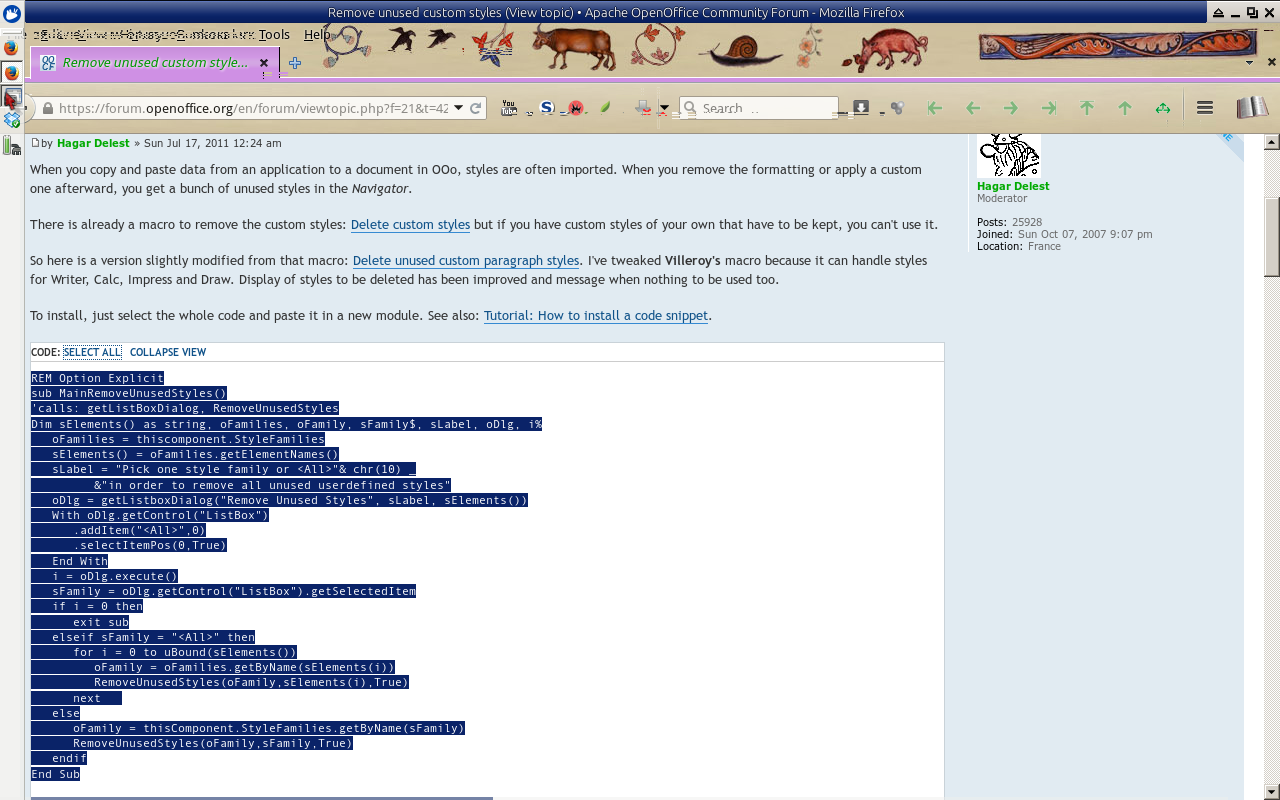
    which in turn led to Remove unused custom styles
    https://forum.openoffice.org/en/forum/viewtopic.php?f=21&t=42571.

    And there it is.
    A macro that removes all styles that are not used by the document in question.

    However, Kumāra's Comment 9
    https://bugs.freedesktop.org/show_bug.cgi?id=46719#c9
    has a good question:  "How do I import this?"

    Screenshots are from:
    • Web browser is Firefox 34.0, as mutilated by Ubuntu;
    • Office Suite is EuroOffice 2014.0.0, from MultiRáció;
    • Operating System is Xubuntu 14.10;

    I initially tested this out on Apache OpenOffice 4.1.1. 

    I make no guarantees that this will work on other setups.

    More specifically, this does not work on either Android Open Office 1.6.3 or EuroOffice for Tablet 1.2  as they do not have the required functionality to do this.

    Opening the program, you have:
    Default EuroOffice Screen

     Then:
    In EuroOffice,:
     ">Tools >Macros >Organize Macros >EuroOffice Basic"
    In Apache OpenOffice:
     ">Tools >Macros >Organize Macros >OpenOffice Basic"
    In LibreOffice:
     ">Tools >Macros >Organize Macros >LibreOffice Basic"

    Select Edit
    Select Edit 

    That brings up the macro editor screen

    Macro Editor Screen
    Delete all of the text on that screen.
    Then type
    "REM https://forum.openoffice.org/en/forum/viewtopic.php?f=21&t=42571#"

    That way you know where you obtained the code from.

    In your web browser, go to https://forum.openoffice.org/en/forum/viewtopic.php?f=21&t=42571#

    Carefully read each of the descriptions of the code snippets, before deciding which one you want to use.
    • Hagar Delest's first macro deletes styles by family, after verification;
    • Hagar Delest's second macro automatically deletes all unused styles;
    • Hagar Delest's third macro enables unused custom styles to not be deleted;

    I used the second macro.

    Cut and paste the appropriate macro.
    LibreOffice does not always accept a "cut and paste" operation.
    This is a security measure, and as such is a good thing.
    Except when you can't paste anything.

    The post has a "Select All" option. Click on it, and then select "Copy" with your browser. Typing "Control C" should copy it. Typing "Control V" should paste it.
    Select The Macro to Copy
    After typing <CTRL-C>
    Switch to OpenOffice
    On the macro editor, type <CTRl-V>
    If that doesn't work, then use ">Edit >Paste"

    Your screen should look like this:

    Pasted Macro


    Rename the macro by clicking on "Module 1", and then "Rename"
    I called it PurgedStyles. The only criteria for the name, is that you can tell what it does, without running it. 

    Then click on the floppy disk icon, (Third icon from the left hand side, on the top row of icons) to save it.

    Now close the editor.  ">Files >Close".

    Now to use it.
    I like keyboard shortcuts, so I assigned it to F4.

    To do that:
    Create a new document:
    ">File >New >Text Document"
    I use a text document, because keyboard assignments can be component specific.
    An existing document can be used. I don't like using existing documents, because of the potential of damage to them. Once, I accidentally deleted a couple of pages, by pressing the wrong key, in the wrong place.

    The only reason for having an open document, is so that something can be assigned to the keyboard.

    ">Tools >Customize >Keyboard"

    The screen should display something akin to:

    Configure Keyboard
    To modify the keyboard:

    There is a radio button for either "Writer" or "Euroffice".
    I tend to make macros component specific.  Other people prefer making them available to all components.
    Check the appropriate radio button.

    Select the Shortcut Key.
    I like to use F1 through F5 for macro's I've imported from elsewhere, and F10 through F12 for quick and dirty macros I've written, and will delete when I've finished for the day.
    Scroll down the list of available shortcut keys.
    • F#;
    • Shift F#;
    • CTRL-character;
    • CTRL-SHIFT-character;
    • ALT-character;
    • ALT-SHIFT-character;
    • CTRL-ALT-character;
    • CTRL-ALT-SHIFT-character;

    In this instance, I am going to use F4.
    In the screenshot below, you can see the macro name highlighted next for F4.

    Switch to the the Category window <ALT-C>.
    Scroll down until you find "EuroOffice Macros", "LibreOffice Macros", "OpenOffice Macros", as appropriate.

    Opening that, there will be:
    • User;
    • Share;
    • Document-name;
    Scroll down to "User". 
    Move into "Standard".
    Select "PurgeStyles", or whatever you called the macro.
    I've highlighted it, in the below screenshot.
    Customization Details

    Switch to the Function window  <ALT-F>.
    For this macro, select "MainRemoveUnusedStyles".
    I've highlighted it, in the above screenshot.
    Other macros will have a different name for the main function.
    Usually, but not always, it is prefixed by "Main".

    Then click on the Modify button <ALT-M>.
    Then click on the Save button <ALT-S>.
    Save Keyboard Configuration
    Strictly speaking, it is not necessary to save the keyboard configuration.
    The main reason for doing so, is when one switches between environments.
    It is much easier to copy configuration files, then recreating them from scratch.

    Now click on the OK button at the bottom right of centre.

    Your macro should be saved, and available for use with other documents.

    Some caveats:
    • Always back up your work;
    • Always use a different file-name for your backups;
    • Keep backups on a different drive;
    I use document-name-date for backups.


    Screenshots were taken with Xfce4 Screenshooter.

    Some screenshots were cropped using GwenView 4.1.1.

    21 December 2014

    When is Apache Open Office Not Apache Open Office

    It should be a simple enough question.

    Either one is using Apache Open Office, or one is not.
    And support should either be from Apache Open Office, or from whoever compiled and distributed the binary that one uses.

    So, in looking at the following screen-shot, the reasonable assumption is that one is using something compiled, and distributed by The Apache Software Foundation. (https://www.apache.org/)

    The Default Screen


    But with a little more exploration
    The "About Screen"

    Both of those photographs are of Android Open Office version 1.6.3.

    If you read the small print on the second screen, you do see that it neither created by, nor distributed by The Apache Software Foundation.

    Furthermore, the adds  --- supplied by Google Mobile Ads --- that the program displays should clue one that it is not an official program.

    All photographs were taken by me.

    06 June 2011

    OpenOffice.org and The Apache Foundation

    Oracle was/is interested in FLOSS, only to the point that it can control and monetize the distribution of FLOSS. As I've written previously, Oracle provided a practical demonstration in how to throw away US$7,400,000,000.00.


    Monetizing FLOSS is far beyond the capabilities of the combined ability of the Fortune 500, much less any single specific company, or division of a company that is on the Fortune 500.

    Controlling the distribution of FLOSS is also beyond the capabilities of the combined ability of the Fortune 500, much less any single specific company, or division of a company that is on the Fortune 500.

    The Apache Software Foundation has specialized in providing tools.  More specifically, tools that provide basic functionality for other things. One of the major things that the Internet, and most intranets run on:
    • AAMP: Android Apache MySQL Perl/Python/PHP;
    • BAMP: BSD Apache MySQL Perl/Python/PHP;
    • LAMP: Linux Apache MySQL Perl/Python/PHP;
    • SAMP: Solaris Apache MySQL Perl/Python/PHP;
    • WAMP: Windows Apache MySQL Perl/Python/PHP;
    The Apache Software Foundation is not geared towards front office software. It has no experience with consumer software.

    The Mozilla Foundation is geared towards front office software.  It does have experience with consumer software.

    Did The Mozilla Foundation/OpenOffice.org partnership permanently sour The Mozilla Foundation? To those on the fringe of both projects, nothing about that partnership was clear. http://www.oreillynet.com/windows/blog/2004/08/openofficeorg_partnership_with.html is perhaps the clearest statement about that partnership.  That bastion of knowledge, both accurate and inaccurate, manages to omit all reference to the OOo/Mozilla partnership.


    Luke Kowalski (Vice President of Oracle Architecture Group) made an interesting statement:
    "Donating OpenOffice.org to Apache gives this popular consumer software a mature, open, and well established infrastructure to continue well into the future. The Apache Software Foundation’s model makes it possible for commercial and individual volunteer contributors to collaborate on open source product development."
     Jim Jagielski (President of The Apache Software Foundation) had an equally interesting statement:
    "We welcome highly-focused, emerging projects from individual contributors, as well as those with robust developer communities, global user bases, and strong corporate backing."

    If Oracle really wanted OOo to go to an organization that was "mature, open, and well established infrastructure to continue well into the future", then The Mozilla Foundation would have been far more appropriate. I'm wondering if Jim Jagielski is subtly pointing out that OOo is being inflicted upon The Apache Software Foundation.

    Measuring the True Success of OpenOffice.org provides a rough indication of the number of programmers working on OOo.  That data implies that the number of active programmers had decreased from a peak of 70 in 2004.   At one point in time, IBM bragged about having 35 coders that would be committed to Symphony, and OpenOffice.org. I don't know what the fruits of that were, but IBM, as is par with their commitment to the accessibility community,  has broken every promise it made about accessibility in OpenOffice.

    LibreOffice Contribution Stats shows 60 code contributors. Unfortunately, it has not made any changes in accessibility. (One big obstacle with A11Y is patents. The USPTO routinely grants patents on things that are nothing more than mathematical algorithms.)

    There is a major contrast between Open Meetings Proposal and the
    OpenOffice.org Proposal when it discusses developers.
    The OpenMeetings proposal lists the number of developers, and how many are paid.

    The OpenOffice.org proposal provides a detailed history of some --- perhaps as many as a quarter --- of the projects that were spawned by OOo.

    In terms of specifics about developers, the best it can do is: "The initial set of committers include people from the community of OpenOffice.org Technology projects." A statement that ignores the fact that virtually all of the community developers shifted to LibreOffice.

    Under salaried developers we have: "The initial group of developers will be employed by IBM, Linux distribution companies, and likely public sector agencies. Localization resources are expected to gravitate to the new project, as well. Ensuring the long term stability of OpenOffice.org is a major reason for establishing the project at Apache." Trouble is, all of the Linux distros are using LibreOffice.  More pointedly, prior to LibreOffice, they were using the Go-OO variant, not the Sun variant.  The "likely public sector agencies" are unknown.  Unless this funding and support is from a black budget item, the odds are that no code, or funding will materialize from a public agency. 

    The Alignment subsection is strange.  "The developers of OpenOffice.org will want to work with the Apache Software Foundation specifically because Apache has proven to provide a strong foundation and set of practices for developing standards-based infrastructure and related components."  No doubt IBM would like developers from other other organizations to contribute code. The reality will probably be vastly different.

    This sub-section also ignores that there is a current foundation, that is shipping the successor to OOo.An organization that is based on merit, and is developing standards-based infrastructure and related components.  A foundation that understands both the OOo user, and the OOo community.

    Finally, as if determined to prove that the writer of the proposal understands neither the OOo community, nor the way OOo mailing lists have historically been set up, we have: "Note: a users mailing is not being requested at this time. It is anticipated that users will interact with the community through existing OpenOffice.org systems."

    Oracle, unlike its namesake at Delphi, has shown a complete inability to communicate with the community that was beholden to it. More pointedly, Oracles actions have repeatedly demonstrated that it holds the community in utter contempt.

    In reading the general@incubator.apache.org it appears that IBM is as contemptuous of the OOo community as Oracle is. On second thoughts, IBM would have to decrease its contempt of the OOo community by several thousand orders of magnitude, simply to be as contemptuous of the OOo community as Oracle is.

    12 May 2011

    Cross Platform Support

    Thus far, there is no office suite that can truthfully claim to be cross-platform.

    None.

    I have a very simple definition of cross-platform support.

    Provide the software for at least fifteen of the following platforms:
    * Linux (32 bit);
    * Linux (64 bit);
    * BSD (32 bit);
    * BSD (64 bit);
    * Mac OS X;
    * Windows 7/Windows Vista/Winsows XP/Windows 2000 (32 bit);
    * Windows 7/Windows Vista/Winsows XP/Windows 2000 (64 bit);
    * eComStation 2.0 / eComStation 1.0 / OS/2 Warp 4.52

    * Solaris/OpenSolaris/Illumos;
    * Windows Server 2003/Windows server 2008/Windows Home Server (64 bit);

    * Ios (iPhone/iPod/iPad);
    * Android (Honeycomb/Gingerbread/Froyo)
    * Symbian;
    * RIM (Blackberry);
    * Windows Mobile 7;
    * Windows Mobile 6.5/Windows Mobile 6.0;

    * xBox 360;
    * Wii;
    * Sony Playstation 3;

    19 April 2011

    How to throw away US$7.4B

    On 15 April 2011, Oracle announced that it would turn OpenOffice.org into a community only project, and that a commercial version would not be distributed.


    Larry Ellison used to make pretty smart decisions.

    Sun's hardware was high end. High Performance machines that are almost at the bleeding edge of computer research.  There are few customers in this area, and they are both price conscious, and task conscious.  For sheer number crunching, a Beowulf cluster of PS3s is more cost effective.  OTOH, when you need to store several petabits of data, Sun's hardware was more cost effective.  This is hardware that geeks  dream about, but usually don't have as their home server, much less personal desktop system.

    By not including drivers that hooked directly into the products that Oracle distributes, Oracle failed to provide its customers with a reason for migrating from Microsoft Office to Oracle Office.


    More pointedly, Oracle sales people could have thrown in a gratis copy of Oracle Office with each seat license that was negotiated.

    When Oracle bought Sun, it acquired a company with:
    * A hardware division;
    * An operating system that had a very dedicated user base;
    * An office suite that had a large and dedicated user base;
    * A programming language that is extensively used;

    These are things that Oracle could have used to cut off Microsoft's oxygen supply from the  high end market side.  FLOSS, especially Linux and OOo were cutting off Microsoft's oxygen supply from the low end market. (Look at Microsoft's SEC filings, to see how precarious Microsoft's financial picture really is.)


    The community base of the operating system abandoned Oracle, once it became clear that Oracle and communication were exclusively mutual concepts.

    The community base of the office suite abandoned Oracle, once it became clear that Oracle could neither communicate, nor manage anything.

    Then Oracle sued Google over Android and Java.  A clear demonstration that it does not grok the fundamentals of computer programming.

    You have to look at Oracle and wonder:  "What is it thinking?"  Intrinisically, purchasing Sun was a good decision. However, every step Oracle took, seemed designed to maximize the amount of money, and goodwill that could be thrown away.  Not just the US$7.4B it spent on Sun, but both post-acquisition costs and pre-acquisition costs.  It also threw away all of the goodwill it purchased from Sun. Based on its own merits, Oracle has had no customer goodwill for more than a decade.

    The 15 April announcement is merely Oracle's admission that they threw away everything that they purchased from Sun.